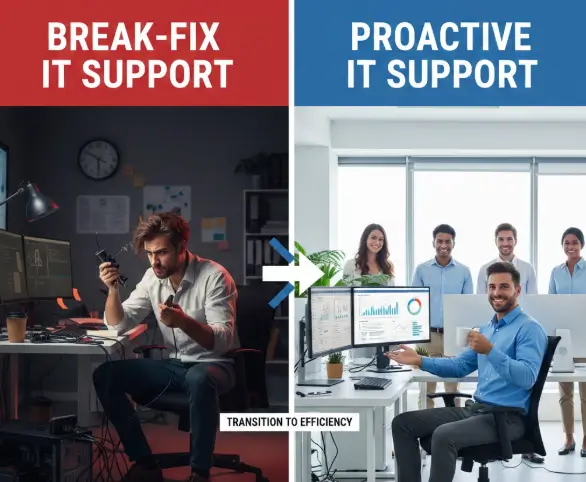
Many small and mid-sized businesses ignore IT until something breaks. At first, this feels smart because it saves money. But over time, this habit creates stress, lost sales, and security risks. Choosing between break-fix and proactive IT support is not technical. It is a business survival decision.
When systems fail, customers notice. Staff lose time. Owners lose sleep. This guide explains both models in clear language, using real situations and proven experience. The goal is simple: help you choose the safest and smartest path for long-term growth. This decision directly impacts operational resilience and strategic IT planning.
What Break-Fix IT Support Really Means
Break-fix IT support works like calling a mechanic after your car stops on the road. You only pay when something breaks. There is no monthly plan, no monitoring, and no prevention. The technician fixes the issue, sends a bill, and leaves. That is the entire system.
Many business owners like this model because it looks cheap. There are no contracts. No regular fees. No long-term commitment. But behind this simplicity hides unpredictable costs, slow response, and repeated failures that slowly damage operations. Many of these disruptions originate from overlooked common IT problems that remain unresolved.
How Proactive IT Support Works in Real Life
Proactive IT support means your systems are watched, updated, and protected all the time. Instead of waiting for problems, experts fix small issues before they become big disasters. You pay a monthly fee for monitoring, maintenance, security, and support.
Think of it like regular health checkups instead of emergency surgery. Servers get patched. Backups are tested. Security threats are blocked early. This model focuses on prevention, stability, and business continuity, not just repair. This prevention-first approach reflects the modern ITaaS model adopted by growth-focused businesses.
Core Differences Between Break-Fix and Proactive Support
The biggest difference is mindset. Break-fix reacts. Proactive prevents. One waits for damage. The other works to avoid damage. This difference affects cost, downtime, security, and growth.
Below is a clear comparison to remove confusion.
Table 1: Break-Fix vs Proactive IT Support
| Feature | Break-Fix Support | Proactive IT Support |
| Approach | Reactive | Preventive |
| Pricing | Pay per issue | Monthly fixed fee |
| Downtime | High risk | Low risk |
| Security | Basic or none | Built-in protection |
| Planning | None | Strategic guidance |
| Scalability | Poor | Strong |
This table shows why many growing businesses eventually move away from break-fix
The Real Cost of “Pay Only When It Breaks”
Break-fix feels cheap because you only see small invoices. But hidden costs build quietly. Staff wait for repairs. Orders get delayed. Data may be lost. Customers lose trust. These losses never appear on IT bills, but they hit revenue.
A single server crash can stop billing, emails, and files for hours. That downtime can cost more than a full year of proactive support. Cheap repairs often create expensive business damage.
Understanding Monthly IT Costs vs Emergency Bills
Many owners fear monthly IT fees. They think paying every month wastes money. In reality, predictable costs protect cash flow. You know exactly what IT will cost. There are no surprise invoices during busy seasons.
Here is a simple comparison.
Table 2: Annual Cost Example for a 25-Person Company
| Cost Type | Break-Fix Model | Proactive Model |
| Emergency Repairs | $6,000 | $0 |
| Downtime Loss | $8,000 | $1,000 |
| Security Incidents | $3,500 | $500 |
| Monthly Fees | $0 | $7,200 |
| Total Yearly Cost | $17,500 | $8,700 |
Proactive support often costs less when all factors are counted.
Hidden Risks Most Break-Fix Users Never See
Break-fix users often think, “Nothing bad has happened yet.” This is dangerous thinking. Most cyber attacks, data losses, and hardware failures happen quietly. By the time you notice, damage is already done.
Without monitoring, backups may fail for months. Security patches may be missing. Old hardware may be close to collapse. These silent risks grow daily. Without active security protection, vulnerabilities accumulate unnoticed. Break-fix leaves your business blind to danger
Cybersecurity: The Biggest Difference Between Models
Today, every business is a target. Hackers do not care about company size. They look for weak systems. Break-fix support rarely includes full security planning. It only reacts after an attack.
Proactive support includes firewalls, updates, backups, and monitoring. Suspicious activity is blocked early. Staff receive guidance. Systems stay current. Security is built into daily operations, not added after disasters.
How Downtime Hurts More Than You Think
Downtime is not just lost hours. Frequent system disruptions often signal deeper infrastructure instability. It breaks routines, frustrates staff, and damages reputation. When systems fail, employees stop working. Customers wait. Deadlines slip. Stress spreads across the office.
One law firm lost clients after repeated email outages. One clinic missed patient records during a server crash. These were break-fix users. Small failures can cause permanent business loss
Scalability: Can Your IT Support Your Growth?
Growing businesses need stable systems. New staff need accounts. New software needs support. Data volumes increase. Compliance rules get stricter. Break-fix cannot plan for growth. It only reacts. Scaling safely requires structured IT consulting, not emergency repairs.
Proactive IT partners help design future systems. They prepare networks for expansion. They advise on tools and upgrades. Growth becomes smoother instead of chaotic
Who Should Still Consider Break-Fix Support
Break-fix is not always wrong. Very small companies with one or two computers and low data risk may use it temporarily. Freelancers, home offices, or side businesses sometimes fit this model.
But once you rely on shared files, customer databases, cloud systems, or online payments, break-fix becomes risky. Most serious businesses outgrow it quickly
Who Benefits Most From Proactive IT Support
Businesses with 10 to 200 employees benefit the most. Law firms, clinics, agencies, logistics companies, and financial firms depend on uptime and security. For them, proactive support is not luxury. It is protection.
These companies need predictable systems. They handle sensitive data. They cannot afford long outages. Proactive support fits their real-world risks.
Real Example: From Chaos to Control
A retail distributor with 30 staff used break-fix for years. Servers crashed twice in one year. Orders were delayed. Customers complained. Emergency bills kept rising. Staff lost confidence.
After switching to proactive support, downtime dropped by 80 percent. Backups were tested weekly. Security improved. Within six months, operations stabilized. Predictability replaced panic
How to Move From Break-Fix to Proactive Support
Transitioning is easier than most owners think. First, systems are audited. Weak points are identified. Backups are verified. Security gaps are closed. Then monitoring tools are installed.
After setup, most work happens quietly in the background. Employees notice fewer problems. Owners see fewer surprises. The shift feels calm, not disruptive
Choosing the Right IT Partner
Not all providers are equal. Look for experience with your industry. Ask about security practices. Demand clear service levels. Request real references. Avoid vague promises.
A good partner explains risks in simple language. They document systems. They plan upgrades. They act like advisors, not just technicians. One example of a business-focused provider is Gateway Tech IT Services, which emphasizes prevention and long-term stability
Building Trust Through Documentation and Transparency
Strong IT support includes proper records. Network maps, passwords, licenses, and backups must be documented. Without this, businesses depend on memory and guesswork. A structured managed framework ensures continuity beyond individual technicians.
Proactive providers maintain clear documentation. Owners can review reports. Issues are tracked. Improvements are planned. Transparency builds confidence and reduces dependency.
Why Predictable IT Creates Better Leadership
When technology runs smoothly, leaders focus on strategy instead of emergencies. Meetings improve. Staff morale rises. Decisions become data-driven. Growth plans become realistic.
IT should support leadership, not distract from it. Proactive support turns technology into a stable foundation. Calm systems create strong management
Long-Term ROI of Proactive IT Investment
Proactive IT is not an expense. It is an investment. It protects revenue, data, and reputation. Over time, it reduces emergency spending and legal risk. It improves customer experience.
Many owners see positive returns within the first year. Fewer crashes. Fewer breaches. Better productivity. Smart prevention pays for itself.
FAQs
The four main types are corrective, preventive, predictive, and adaptive maintenance. Corrective fixes problems after failure. Preventive reduces future risks. Predictive uses monitoring to stop issues early. Adaptive updates systems for new business or technology needs.
The three common types are break-fix services, managed IT services, and consulting services. Break-fix handles emergencies. Managed services provide ongoing support. Consulting helps with planning, upgrades, and long-term technology decisions for business growth.
Break-fix activities include diagnosing issues, repairing hardware, removing viruses, restoring data, fixing networks, and reinstalling software. All work happens after something fails. There is no monitoring, no prevention, and no long-term system planning.
In ServiceNow, break-fix refers to handling incident tickets after a system fails. Technicians respond to reported problems, resolve them, and close the ticket. It focuses on fixing faults, not preventing future failures.
Break-fix reacts after problems occur and charges per repair. Managed services monitor systems continuously and charge a fixed monthly fee. Managed services focus on prevention, security, and stability, while break-fix focuses only on short-term repairs.
Conclusion
Most businesses change their IT model after a disaster. That is the worst time to decide. Pressure leads to poor choices. Costs rise. Trust falls.
Choosing proactive support early gives control. It protects operations. It supports growth. It reduces fear. In modern business, waiting for systems to break is no longer a safe strategy.
If stability, security, and predictable growth matter to you, proactive IT is not optional. It is essential.