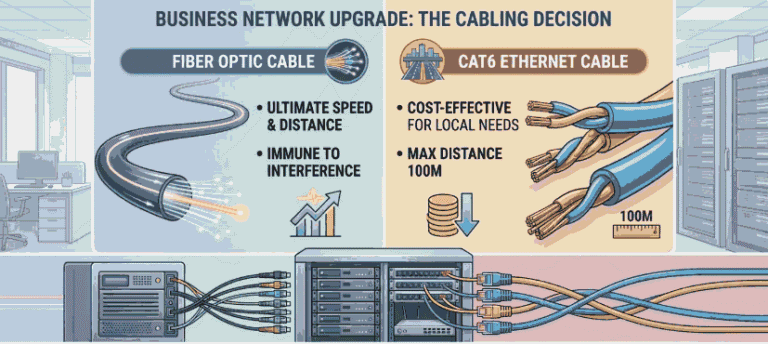
Businesses upgrading their network often face the same question should they install fiber optic cable or stick with CAT6 . Many assume fiber is always the better choice because it is faster. In reality, choosing the wrong cable can lead to unnecessary costs or a network that does not fit the business environment.
Step into almost any office server room and you hear the same discussion. One person pushes for fiber everywhere because it is faster. Another argues that CAT6 already does everything the office needs. Both sides have a point. The real answer is that these cables solve different problems, and most reliable networks use them together.
What most businesses do not realize is that the best network designs rarely choose just one cable type. The decision depends on factors like distance, bandwidth demand, device power requirements, and long-term scalability.Once these factors are clear, the choice between CAT6 and fiber becomes much easier.
CAT6 or Fiber
Before getting into the details, here is the basic rule many IT teams follow when designing a business network.
| Situation | Best Choice | Reason |
|---|---|---|
| Office computers, printers, phones | CAT6 | Supports Power over Ethernet and installs easily |
| Cable runs under 100 meters | CAT6 | Reliable performance at lower cost |
| Connecting separate buildings | Fiber | Maintains signal across long distances |
| High-capacity network backbone | Fiber | Handles very large data loads |
| Security cameras and Wi-Fi access points | CAT6 | One cable carries both power and data |
This table highlights something important. Modern networks rarely choose one cable exclusively. Fiber handles heavy data traffic in the backbone, while CAT6 connects everyday equipment.
What Is a Fiber Optic Ethernet Cable?
A fiber optic cable sends information using light traveling through extremely thin glass strands. Instead of electrical signals moving through copper, data moves as light pulses inside the cable. Because light travels with very little resistance, fiber maintains strong signal quality across long distances. That is the reason fiber networks appear in large buildings, campuses, and data centers.Businesses planning long-distance network infrastructure often rely on fiber optic cabling to maintain high-speed connections between buildings or server rooms.
Inside the cable, several protective layers surround the glass core. These layers protect the delicate fibers from bending, pressure, and environmental damage. Once installed correctly, fiber becomes one of the most stable networking solutions available. The real advantage appears when distance increases. Fiber cables can carry data hundreds of meters or even several kilometers without losing signal strength, which makes them ideal for connecting separate buildings or network rooms.
Types of Fiber Optic Cables Businesses Use
| Fiber Type | Distance | Typical Use |
|---|---|---|
| Multimode Fiber | 300–400 meters | Inside buildings |
| Single-Mode Fiber | Several kilometers | Building-to-building connections |
What Is CAT6 Ethernet Cable?
CAT6 is a copper Ethernet cable widely used in local networks. Inside the cable are four twisted pairs of copper wires designed to reduce interference and maintain stable data transmission. Most office networks rely on CAT6 because it offers a practical balance of speed, cost, and ease of installation. For companies upgrading their internal wiring, professional CAT6 network wiring ensures reliable connectivity for workstations, phones, and access points. Network technicians can terminate these cables quickly, and the equipment required to support them is easy to find.
A properly installed CAT6 network supports gigabit speeds without difficulty, and under certain conditions it can reach 10 gigabits over shorter distances. For typical office tasks like video calls, file sharing, and cloud applications, that performance is more than sufficient.CAT6 also supports Power over Ethernet a feature that becomes important as businesses add more connected devices.
Speed and Bandwidth: Where Fiber Has the Advantage
Speed comparisons often dominate conversations about network cabling. That focus makes sense because fiber was built for environments that move large volumes of data. CAT6 networks commonly operate at 1 gigabit per second across standard cable runs. In some setups they can achieve higher speeds, but distance limitations eventually reduce performance.
Fiber networks operate on an entirely different scale.Many fiber connections easily support 10Gb, 40Gb, or even faster links, which explains why they dominate in data center infrastructure and enterprise networks. However, raw speed is not always the deciding factor. Many offices simply do not generate enough internal traffic to justify extremely high capacity links.
Fiber vs CAT6 Latency: Does It Matter?
Explain simply:
- Fiber usually performs better across long distances.
- In short office networks, latency differences are minimal.
- For data centers or high frequency systems, fiber becomes more valuable.
Distance Limits: Where Fiber Becomes Necessary
Distance often determines which cable makes sense.
CAT6 performs best within 100 meters, which equals about 328 feet. Once the cable run approaches or exceeds that limit, signal quality begins to weaken. Fiber does not face the same restriction. Even basic multimode fiber can transmit data several hundred meters without signal degradation. Single-mode fiber stretches much farther and can connect locations kilometers apart.
This capability explains why organizations with large properties depend on fiber. Examples include:
- corporate campuses
- large warehouse complexes
- hospitals
- universities
- multi-building office parks
In these environments, copper simply cannot cover the required distances reliably.
Best Cable Choice for Different Business Environments
| Environment | Recommended Cable |
|---|---|
| Small office | CAT6 |
| Large office building | CAT6A or fiber backbone |
| Warehouse facility | Fiber backbone + CAT6 |
| Campus network | Fiber |
Installation and Infrastructure Costs
Cost discussions around network cabling can sometimes be misleading. CAT6 networks are generally straightforward to install. Businesses with legacy infrastructure sometimes combine Ethernet wiring with coax network cabling when upgrading older communication systems. The cables are affordable, the connectors are simple, and most technicians already have the tools required for installation.
Fiber installations introduce additional components. Businesses often need optical transceivers, specialized termination tools, and fiber-compatible switches. These requirements increase both equipment costs and installation complexity. Even so, some organizations still choose fiber when planning long-term infrastructure upgrades. Installing higher-capacity cabling today can prevent expensive replacements in the future.
Fiber vs CAT6 Cost Breakdown
| Cost Factor | CAT6 | Fiber |
|---|---|---|
| Cable price | Lower | Higher |
| Installation | Easier | Requires specialized tools |
| Hardware | Standard switches | Fiber switches & SFP modules |
| Maintenance | Simple | Slightly more complex |
Power over Ethernet: Why CAT6 Still Dominates Inside Buildings
One feature keeps CAT6 essential for many devices: Power over Ethernet. With PoE, the network cable itself supplies electricity along with data. Devices such as security cameras, wireless access points, and VoIP phones depend on this capability. In many offices security camera setup also depends on PoE enabled network cables for both power and data transmission. Fiber cables cannot deliver electrical power. Installing fiber for those devices would require separate power wiring, which increases both cost and installation time. Because of this limitation, even networks with extensive fiber infrastructure continue using CAT6 for endpoint devices.
CAT6 vs CAT6A vs Fiber
When companies consider upgrades, another option sometimes appears between CAT6 and fiber: CAT6A.
CAT6A improves performance by supporting 10-gigabit speeds across the full 100-meter cable length, making it suitable for high-performance office environments.
| Cable Type | Maximum Speed | Common Use |
|---|---|---|
| CAT6 | 1Gb to 10Gb | Standard office networks |
| CAT6A | 10Gb across full distance | High-performance local networks |
| Fiber | 10Gb to 100Gb+ | Backbone and long-distance connections |
For growing organizations that expect increasing network traffic, CAT6A can provide a useful middle ground between copper and fiber infrastructure.
How Modern Business Networks Are Designed
Real networks rarely rely on a single cable type. Most organizations follow a layered design. Fiber carries high-capacity data traffic between server rooms, floors, or buildings. From those central points, switches distribute connections to workstations and devices using CAT6.
This approach offers both performance and flexibility. Heavy traffic moves quickly across the fiber backbone, while everyday devices remain connected through reliable copper links. Another advantage is easier upgrades. When bandwidth demands increase, businesses can improve backbone capacity without replacing every cable in the building.
Typical Business Network Architecture
CAT6 to Devices: The final copper cabling layer connecting individual PCs, printers, and VoIP phones to the access switches.
- Internet: The external connection from the ISP (Internet Service Provider).
- Firewall: The security perimeter filtering incoming and outgoing traffic. Proper router configuration is equally important because it controls traffic flow between internal networks and the internet.
- Core Switch: The high-speed backbone of the internal network, handling heavy traffic routing.
- Fiber Backbone: High-bandwidth cabling (typically 10Gbps or higher) connecting the core to distribution/access points.
- Access Switches: Localized switches that connect different departments or floors to the network.
When Should a Business Upgrade to Fiber?
Businesses usually move toward fiber when certain conditions appear. Rapid company growth may push existing infrastructure beyond its limits. Large facilities may require longer cable runs between network rooms. In other cases, data-intensive systems demand faster communication between servers. When these situations occur, fiber provides the capacity and distance required to keep the network operating smoothly.
Common Network Cabling Mistakes Businesses Make
Examples:
- Running CAT6 between buildings
- Installing fiber everywhere unnecessarily
- Ignoring future bandwidth needs
Real-World Example: A Hybrid Network in Action
Consider a logistics company expanding its operations. The original warehouse relied entirely on CAT6 cabling. When the company built a second facility nearby, the IT team faced a new challenge. The distance between buildings exceeded safe copper limits.
Engineers solved the problem by installing fiber between the two buildings to create a high-speed backbone. Industries with complex environments, including hospitals, often depend on healthcare IT systems to maintain secure and reliable connectivity across multiple departments. Healthcare facilities, for example, often integrate connected equipment through medical device connectivity platforms that rely on both fiber backbone links and Ethernet device connections.
Inside each warehouse, CAT6 continued connecting computers, access points, and security cameras. The result was a stable network that supported growth without replacing the entire system.
How to Decide Between CAT6 and Fiber
Use CAT6 if:
- cable runs are under 100 meters
- devices require Power over Ethernet
- the network supports normal office workloads
Use fiber if:
- connecting buildings
- long-distance cabling is required
- high-bandwidth backbone infrastructure is needed
FAQs
Yes. Fiber optic cables can support much higher speeds because they transmit data as light instead of electrical signals. Many fiber networks handle 10Gb, 40Gb, or even higher speeds, while most CAT6 networks operate at 1Gb to 10Gb over shorter distances.
CAT6 Ethernet cables work reliably up to 100 meters (328 feet). Beyond this distance, signal quality starts to drop. For longer connections between buildings, floors, or large facilities, fiber optic cable is usually the safer and more stable option.
No. Fiber cannot fully replace CAT6 in most networks. Many devices like security cameras, Wi-Fi access points, and VoIP phones require Power over Ethernet (PoE), which fiber cannot provide. That’s why most business networks use fiber for backbone links and CAT6 for devices.
Yes, and they often do. Most modern networks combine both cables. Fiber handles high-capacity backbone connections between switches or buildings, while CAT6 connects computers, printers, cameras, and Wi-Fi access points. This hybrid design balances performance, cost, and flexibility.
Usually not. CAT6 is a practical choice for home networks because it supports gigabit internet speeds and modern devices without problems. Even if your current internet speed is lower, installing CAT6 can help future-proof your home network for faster connections later.
The better option depends on the situation. Ethernet (CAT6) works well for short indoor connections and devices needing power, while fiber is better for long distances, high-capacity networks, and connecting separate buildings. Many reliable networks use both together.
The main drawbacks are higher installation costs and specialized equipment requirements. Fiber also cannot deliver electrical power to devices, unlike CAT6 with Power over Ethernet. Because of this, fiber networks usually require additional hardware and careful installation planning.
Conclusion
The discussion around CAT6 and fiber often sounds like a competition. In practice, successful networks treat them as complementary technologies.CAT6 provides reliable device connectivity and supports Power over Ethernet. Fiber delivers the speed and distance needed for backbone infrastructure.
Most well-designed networks combine both. Fiber handles high-capacity connections between network points, while CAT6 connects the devices people rely on every day. When businesses choose cabling based on real operational needs rather than trends, the network becomes stronger, more scalable, and far easier to manage.